データ作成について
入稿データについて
ACCEA EXPRESSは超特急の印刷サービスです。そのためデータはすべて完全データで入稿いただきます。
完全データとは、印刷の際に手を加える必要のない完成されたデータのことを指します。
入稿できるデータはIllustrator、Photoshop、PDFデータの完全データのみとなります。
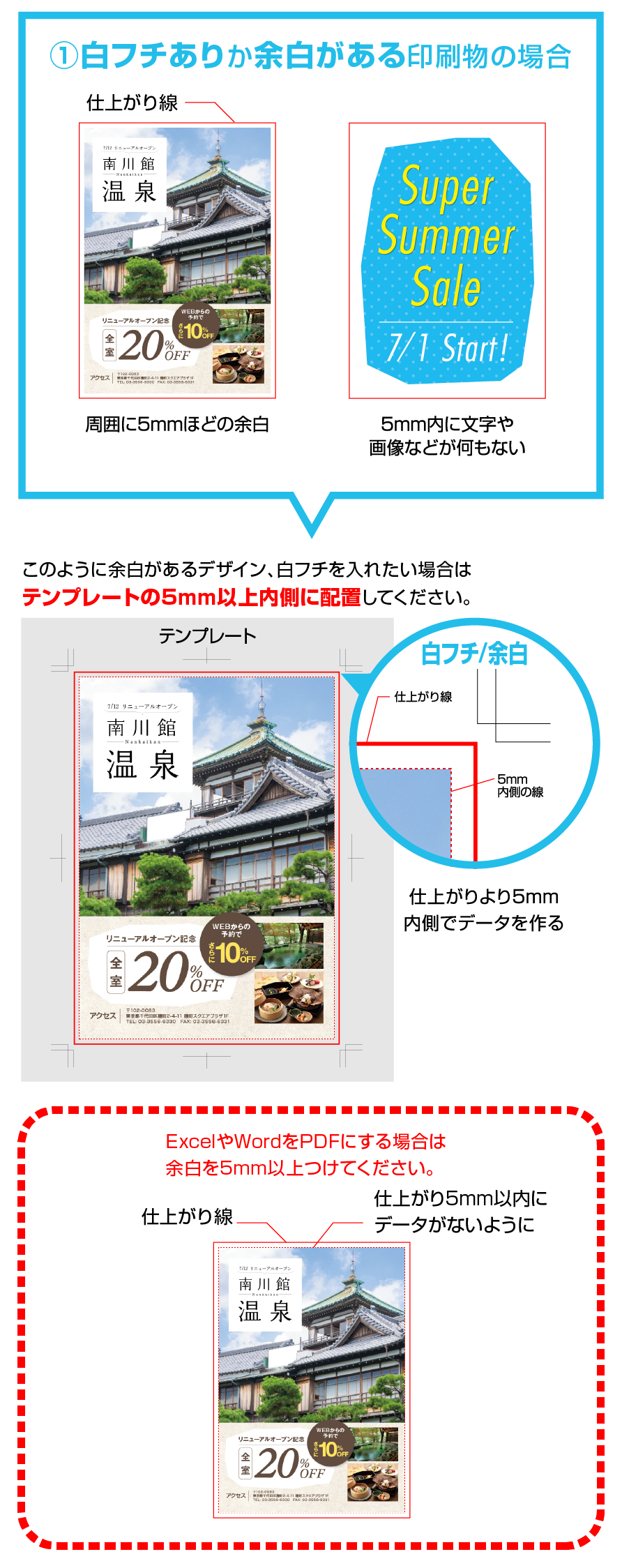
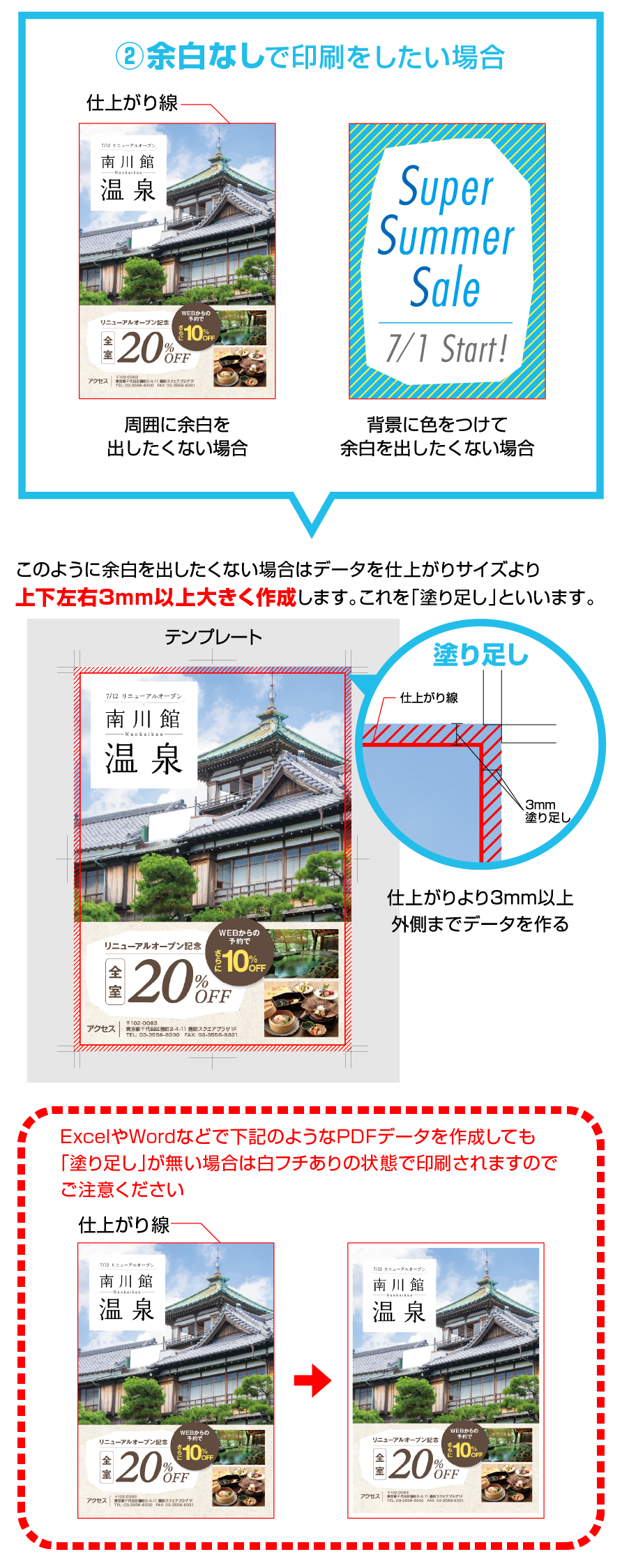
また余白無し(白フチ無し)の仕上がりを希望の場合は、必ず塗り足しが必要になりますのでご注意ください。
※入稿いただいたデータに不備があった場合、お時間に間に合わない場合がございますので、ご注意ください。
完全データチェック項目
- □ Illustrator、Photoshop、又はPDFデータである
- □ Illustratorでデータ作成をした場合、全てのフォントをアウトライン化している
- □ Illustratorでデータ作成をした場合、リンク画像は埋め込みか同じフォルダにまとめている
- □ 余白無しの印刷を希望の場合は塗り足しを作成している
データ作成時の注意点
Adobeソフトの対応バージョン
Illustrator(CCまで対応)Photoshop(CCまで対応)Acrobat PDF
Adobe Photoshopの注意点
解像度は大判出力の場合、原寸で100dpi程度、A3以下のカラー出力の場合は300dpi程度必要です。
レイヤーは統合していただき、CMYKモードで保存して下さい。
Acrobat PDFの注意点
セキュリティの設定があると、印刷時にエラーが出るときがあります。
画像について
- ●リンクは埋め込むか、または「.ai」データの他にリンク画像をCMYKモードのEPS(推奨)、JPEG、PSDなどのファイル形式にして一緒にご入稿ください。
- ●透明効果、ドロップシャドウ等フィルター効果をお使いの場合、ラスタライズして下さい。
- ●サイズにもよりますが、大判出力の場合は原寸で100dpi程度、A3以下のカラー出力の場合は300dpi程度必要です。
- ●オーバープリントのチェックが入っていると、反映されず画像の一部がヌケてしまいます。必ずチェックを外してご入稿ください。
白フチ有り、無しについて
背割れについて
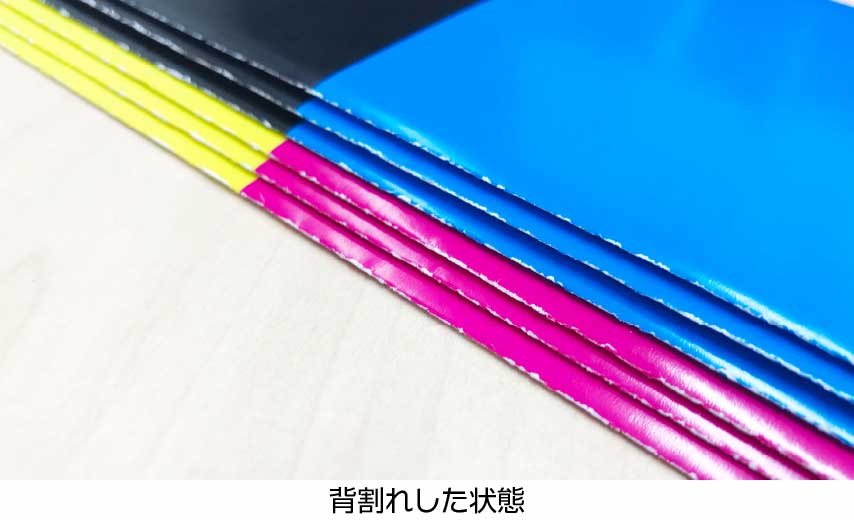
インクジェット印刷と異なり、レーザープリンターでの印刷はインクではなくトナーという粉での印刷となります。
トナーは紙に染みこまず表面にのっている為、機械折りをした際に中の紙の色(白色)が見えてしまう「背割れ」が発生します。
印刷の性質上、紙割れを完全に避けるのは不可能です。
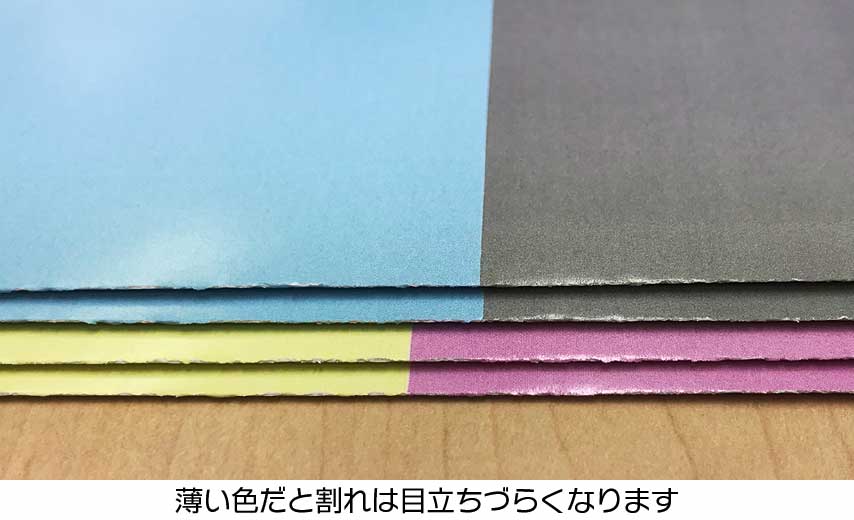
特に、折り部分に濃いベタの色を印刷するデザインや、紙厚が厚くなるほど目立ちやすくなります。
折り部分を薄い色または白にするなど、なるべく折り目部分へのデザインを避けていただだきますと背割れが目立ちにくくなります。
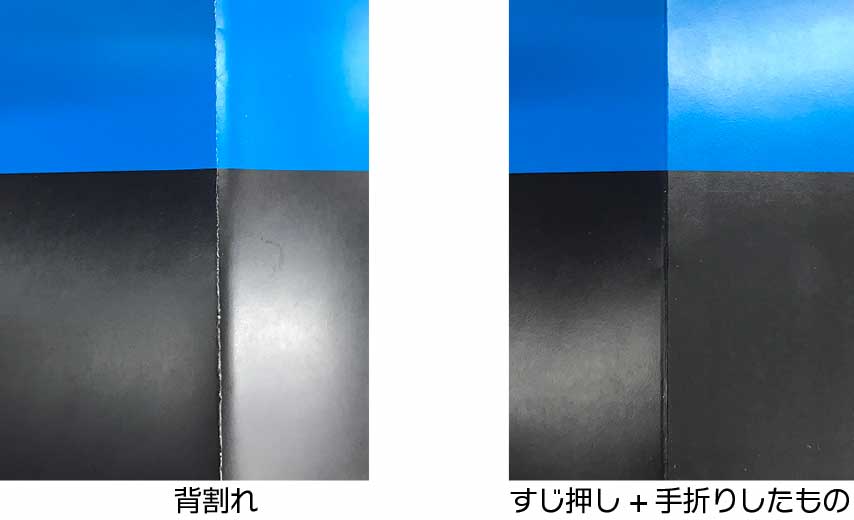
紙割れの軽減をご希望の場合は「すじ押し+手折り」をご希望いただきますと別途見積もりにて作成が可能です。
※注文時に「すじ押し+手折り仕上げ希望」とご記入ください。
※こちらの加工は特急仕上げには対応しておりません。金額と納期は別途お知らせいたします。
複数のファイルを送るには
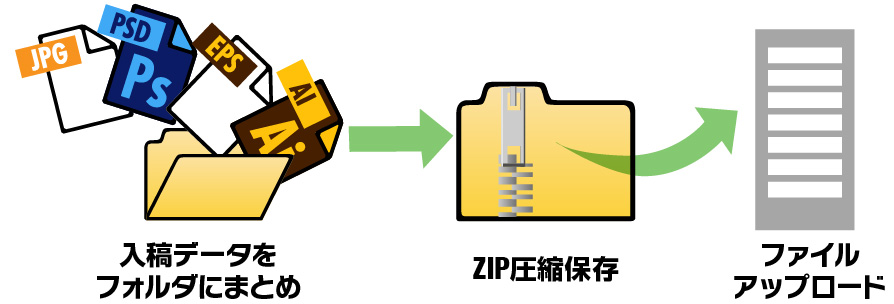
複数ファイルをひとつのフォルダにまとめ、ZIP形式で圧縮すると1つのファイルとして送ることができます。送り忘れなど防ぐこともできますので、おすすめです。
- ※ 1ファイル3GB以内でアップロードしてください。
- ※ 入稿データは入稿日より1ヶ月でサーバーより自動削除されます。
テンプレート一覧
▼下記より専用のテンプレートをダウンロードしてデータを作成してください。
名刺印刷 テンプレートダウンロード
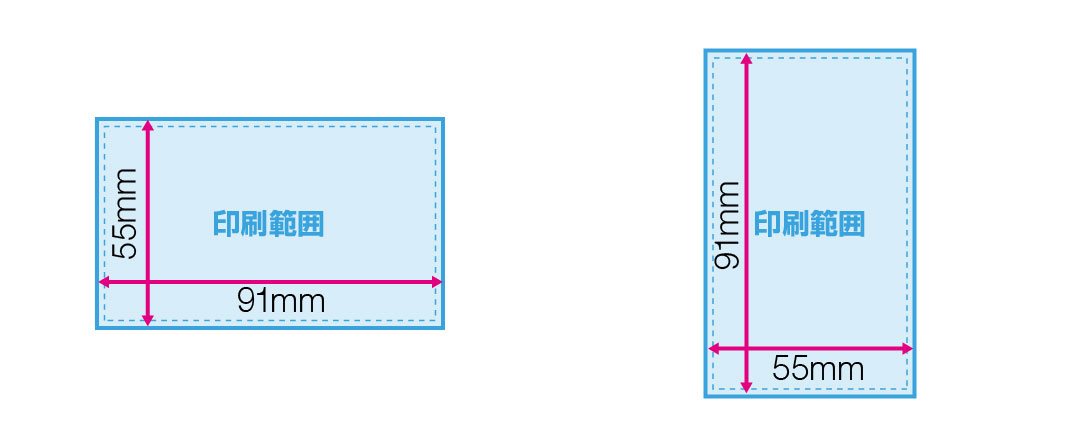
テンプレートダウンロード
※Adobe Illustrator バージョンCC以上対応
テンプレートダウンロード
※.psdファイル テンプレート
テンプレートダウンロード
※.pptx(PowerPoint プレゼンテーション)
チケット印刷 テンプレートダウンロード
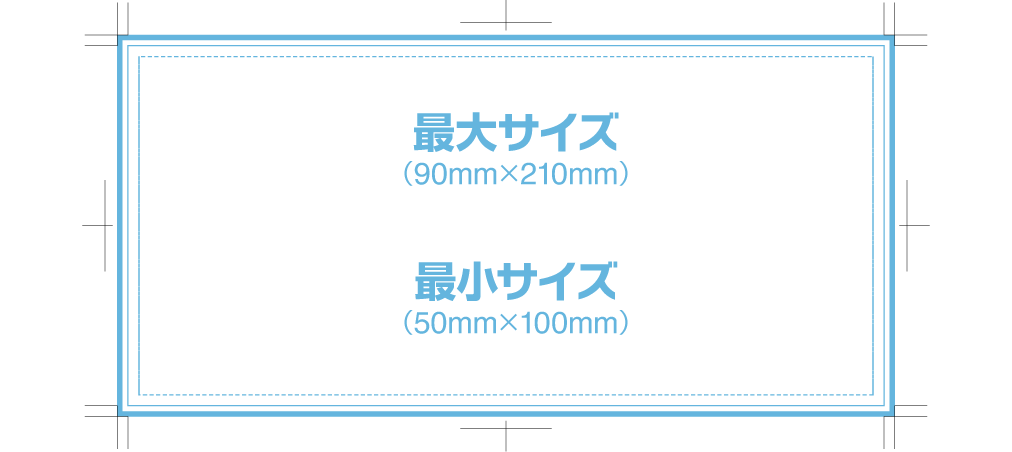
チラシ / フライヤー印刷 テンプレートダウンロード
| サイズ | 短辺×長辺(mm) | ダウンロード |
|---|---|---|
| A5 | 148×210 |
A5 テンプレート(Adobe Illustrator) A5 テンプレート(Adobe Photoshop) |
| B6 | 128×182 |
B6 テンプレート(Adobe Illustrator) B6 テンプレート(Adobe Photoshop) |
| A4 | 210×297 |
A4 テンプレート(Adobe Illustrator) A4 テンプレート(Adobe Photoshop) |
| B5 | 182×257 |
B5 テンプレート(Adobe Illustrator) B5 テンプレート(Adobe Photoshop) |
| A3 | 297×420 |
A3 テンプレート(Adobe Illustrator) A3 テンプレート(Adobe Photoshop) |
| B4 | 257×364 |
B4 テンプレート(Adobe Illustrator) B4 テンプレート(Adobe Photoshop) |
大判ポスター印刷 テンプレートダウンロード
| サイズ | 短辺×長辺(mm) | ダウンロード |
|---|---|---|
| A0 | 841×1189 |
A0 テンプレート(Adobe Illustrator) A0 テンプレート(Adobe Photoshop) |
| A1 | 594×841 |
A1 テンプレート(Adobe Illustrator) A1 テンプレート(Adobe Photoshop) |
| A2 | 420×594 |
A2 テンプレート(Adobe Illustrator) A2 テンプレート(Adobe Photoshop) |
| A3 | 297×420 |
A3 テンプレート(Adobe Illustrator) A3 テンプレート(Adobe Photoshop) |
| サイズ | 短辺×長辺(mm) | ダウンロード |
|---|---|---|
| B0 | 1030×1456 |
B0 テンプレート(Adobe Illustrator) B0 テンプレート(Adobe Photoshop) |
| B1 | 728×1030 |
B1 テンプレート(Adobe Illustrator) B1 テンプレート(Adobe Photoshop) |
| B2 | 515×728 |
B2 テンプレート(Adobe Illustrator) B2 テンプレート(Adobe Photoshop) |
| B3 | 364×515 |
B3 テンプレート(Adobe Illustrator) B3 テンプレート(Adobe Photoshop) |
折りパンフレット(三つ折りの場合) テンプレートダウンロード
- *サイズ表 JIS規格寸法
- *Adobe Illustrator バージョン10以上対応
| サイズ | 短辺×長辺(mm) | ダウンロード |
|---|---|---|
| A4 | 210×297 | A4 テンプレート |
| A3 | 297×420 | A3 テンプレート |
| サイズ | 短辺×長辺(mm) | ダウンロード |
|---|---|---|
| B5 | 182×257 | B5 テンプレート |
| B4 | 257×364 | B4 テンプレート |
ポストカード テンプレートダウンロード
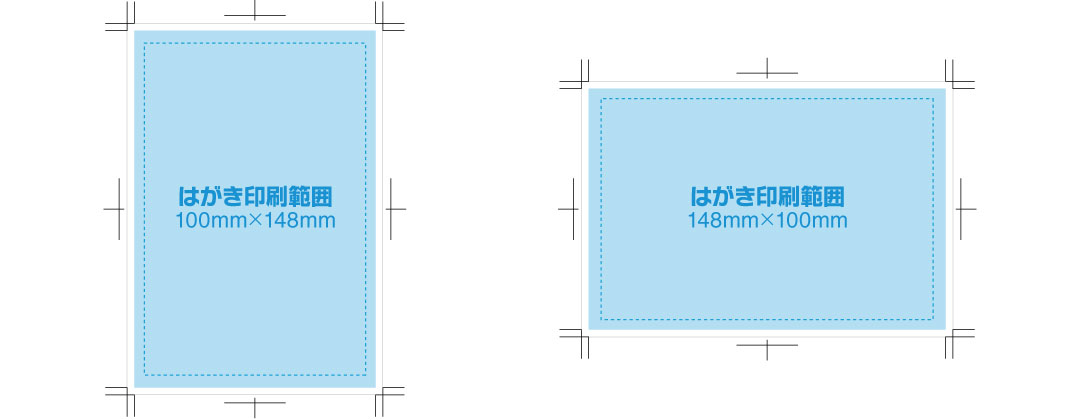
テンプレートダウンロード
※Adobe Illustrator バージョンCC以上対応
テンプレートダウンロード
※.psdファイル テンプレート
シール・ステッカー テンプレートダウンロード
| 対応シール紙 | サイズ | 印刷可能 範囲 (mm) |
ダウンロード |
|---|---|---|---|
| - アートタック紙 - キャストタック紙 - 訂正シール(上質紙) - 訂正シール(アート) |
A4 | 155×230 | A4 テンプレート |
| A3 | 250×360 | A3 テンプレート | |
| - クリアシール紙 | A4 | 140×207 | A4 テンプレート |
| A3 | 220×330 | A3 テンプレート |
アクリルキーホルダー テンプレートダウンロード
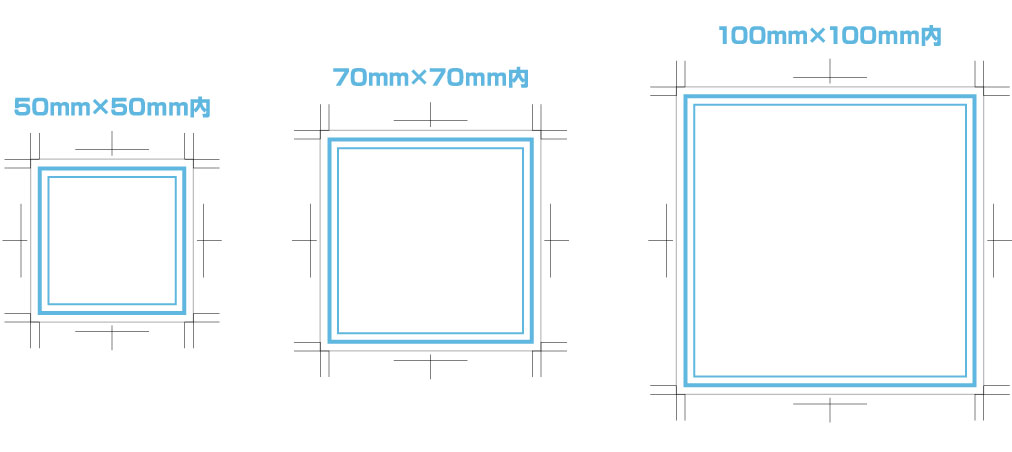
| 種類 | ダウンロード |
|---|---|
| 透明アクリル+フルカラーUVプリント+フリーカット | テンプレートダウンロード |
| 透明アクリル+レーザー彫刻 +フリーカット | テンプレートダウンロード |
| カラーアクリル+フリーカット | テンプレートダウンロード |
アクリルフィギュア テンプレートダウンロード

テンプレートダウンロード
※Adobe Illustrator バージョンCC以上対応
テンプレートダウンロード
※.psdファイル テンプレート
封筒 テンプレートダウンロード
| 封筒種類 | 対応用紙 | ダウンロード |
|---|---|---|
| 長3封筒 | クラフト 未晒(みざらし)クラフト |
テンプレートダウンロード |
| ケント ケントオペーク ハーフカラー コットン |
テンプレートダウンロード | |
| 洋長3封筒 | ケント ハーフカラー |
テンプレートダウンロード |
| クラフト 未晒(みざらし)クラフト |
テンプレートダウンロード | |
| ケントオペーク コットン コットンパール |
テンプレートダウンロード | |
| 角2封筒 | ケント ケントオペーク ハーフカラー コットン コットンパール |
テンプレートダウンロード |
| クラフト 未晒(みざらし)クラフト |
テンプレートダウンロード |
ロールアップバナースタンド テンプレートダウンロード
| 短辺×長辺(mm) | ダウンロード |
|---|---|
| W800×H2000mm |
W800×H2000mm テンプレート (Adobe Illustrator) W800×H2000mm テンプレート (Adobe Photoshop) |
タペストリー テンプレートダウンロード
- *Adobe Illustrator バージョンCS以上対応
| サイズ | 短辺×長辺(mm) | ダウンロード |
|---|---|---|
| A0 タペストリー | 841×1189 |
A0 タペストリーテンプレート (屋内用、屋外用 袋込み/袋別) |
| A1 タペストリー | 594×841 |
A1 タペストリーテンプレート (屋内用、屋外用 袋込み/袋別) |
| A2 タペストリー | 420×594 |
A2 タペストリーテンプレート (屋内用、屋外用 袋込み/袋別) |
| B0 タペストリー | 1030×1456 |
B0 タペストリーテンプレート (屋内用、屋外用 袋込み/袋別) |
| B1 タペストリー | 728×1030 |
B1 タペストリーテンプレート (屋内用、屋外用 袋込み/袋別) |
| B2 タペストリー | 515×728 |
B2 タペストリーテンプレート (屋内用、屋外用 袋込み/袋別) |
| B3 タペストリー | 364×515 |
B3 タペストリーテンプレート (屋内用、屋外用 袋込み/袋別) |
| 不定形サイズ タペストリー |
サイズ変更してお使いください |
不定形サイズ タペストリーテンプレート (屋外用 袋込み/袋別) |
横断幕 テンプレートダウンロード
- *Adobe Illustrator バージョンCS以上対応
| サイズ | ダウンロード | |
|---|---|---|
| 横断幕 | サイズ変更してお使いください |
横断幕 テンプレートダウンロード (ロープ入れ無し / ロープ入れ有り) |
等身大パネル(大判ポスター貼合わせタイプ) テンプレートダウンロード
| 長辺×短辺(mm) | ダウンロード |
|---|---|
| 1000×890 | 1000×890 テンプレート |
| 1200×890 | 1200×890 テンプレート |
| 1500×890 | 1500×890 テンプレート |
| 1800×890 | 1800×890 テンプレート |
| 2000×1000 | 2000×1000 テンプレート |
| 2400×1100 | 2400×1100 テンプレート |
等身大パネル(発泡パネル ダイレクトプリントタイプ) テンプレートダウンロード
| 長辺×短辺(mm) | ダウンロード |
|---|---|
| 1000×890 | 1000×890 テンプレート |
| 1200×890 | 1200×890 テンプレート |
| 1500×890 | 1500×890 テンプレート |
| 1800×890 | 1800×890 テンプレート |
| 2000×1000 | 2000×1000 テンプレート |
| 2400×1200 | 2400×1200 テンプレート |
等身大パネル(段ボール ダイレクトプリントタイプ) テンプレートダウンロード
| 長辺×短辺(mm) | ダウンロード |
|---|---|
| 1000×890 | 1000×890 テンプレート |
| 1200×890 | 1200×890 テンプレート |
| 1500×890 | 1500×890 テンプレート |
| 1800×890 | 1800×890 テンプレート |
切り抜きパネル テンプレートダウンロード
- *サイズ表 JIS規格寸法
- *Adobe Illustrator バージョン10以上対応
| サイズ | 短辺×長辺(mm) | ダウンロード |
|---|---|---|
| A3 | 297×420 | A3 テンプレート |
| A2 | 420×594 | A2 テンプレート |
| A1 | 594×841 | A1 テンプレート |
| サイズ | 短辺×長辺(mm) | ダウンロード |
|---|---|---|
| B3 | 364×515 | B3 テンプレート |
| B2 | 515×728 | B2 テンプレート |
キャンバスプリント テンプレートダウンロード
| サイズ | 印刷範囲 (塗り足し範囲) |
ダウンロード |
|---|---|---|
| F3号 | 273mm×220mm (283mm×230mm) |
F3 テンプレート(Adobe Illustrator) F3 テンプレート(Adobe Photoshop) |
| F6号 | 410mm×318mm (420mm×328mm) |
F6 テンプレート(Adobe Illustrator) F6 テンプレート(Adobe Photoshop) |
| F10号 | 530mm×455mm (540mm×465mm) |
F10 テンプレート(Adobe Illustrator) F10 テンプレート(Adobe Photoshop) |
| F20号 | 727mm×606mm (737mm×616mm) |
F20 テンプレート(Adobe Illustrator) F20 テンプレート(Adobe Photoshop) |