Product List

Tips for Saddle-Stitched Booklet Data

Saddle-stitched booklet specifications

Saddle-stitched booklet printing involves stacking open pieces and stapling them in the center, so the total number of pages must always be a multiple of 4. Blank pages without printing are also counted in the total page count. Also, since the fore edge is trimmed, the finished size will be slightly smaller than the actual size.

Saddle-stitched booklet specifications

* For left binding. For right binding, the order is reversed.

How to create (impose) data

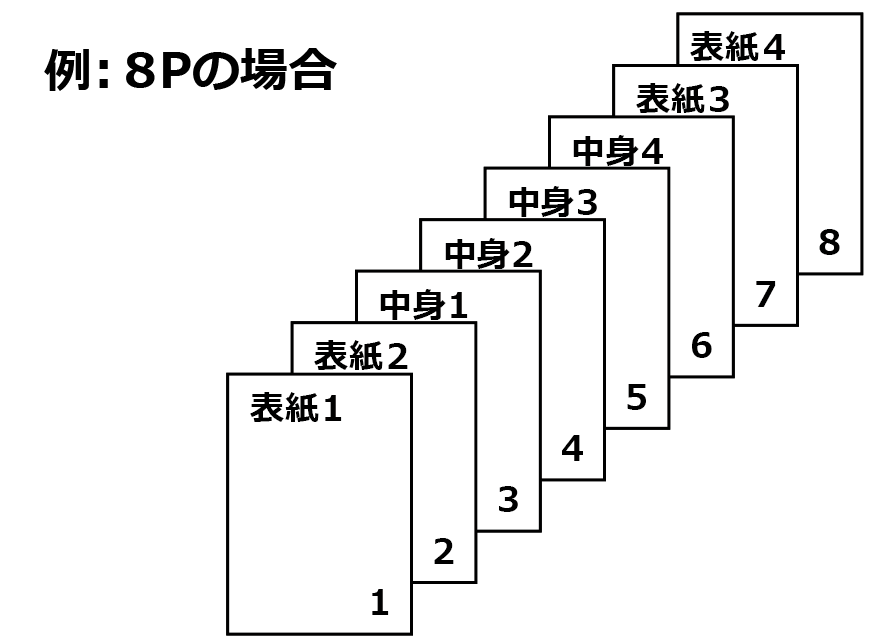
Depending on the binding method (left, right, or top), the cover position and page order will differ.

● For finishes with a white border (margin around the edges)

  • ◎ Please submit a PDF file with pages in order and at the finished size.
With margin
For 8 pages
If the finished size is A4, please submit a PDF with pages in order at A4 size.

● For finishes without a white border (no margin)

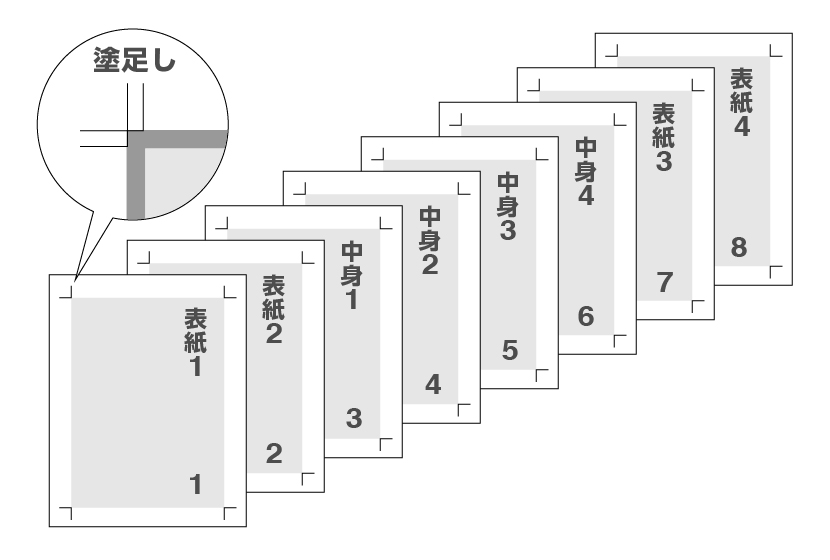
  • ◎ Be sure to include bleed in your data.
  • ◎ Submit either a PDF with pages in order or an outlined AI file.
No margin
Bleed
  • * If you need imposition by ACCEA, please order via Web Submission instead of Express.

Layout near the fore edge

For saddle-stitched booklets, the fore edge will be trimmed during finishing.
Depending on paper thickness and page count, inner pages will be trimmed more at the fore edge.
Do not place important text or design elements too close to the finished size edge.

Final trim line

The further into the booklet, the more is trimmed at the edge, so border designs may be cut off.

Top binding

Layout for spreads

There may be slight misalignment at the spread during binding.
If you place images or text across a spread, please note that some misalignment may occur.

Layout for spreads

Product List

Cut Vinyl Sticker
ACCEA Official Website
lang
Close